
“Ask about OneConnect” – If you have questions that are not displayed on the FAQs page, please contact us in our Contact Us section.
OneConnect Oracle Cloud FAQs
FAQs
What is OneConnect Oracle Cloud?
“OneConnect Oracle Cloud” is a comprehensive, cloud-based suite of applications designed to streamline and integrate an organization’s core business processes, such as financial management, procurement, project management, accounting, and supply chain management. It is part of OneConnect Oracle Cloud suite of applications, leveraging modern technologies like artificial intelligence, machine learning, and analytics to help organizations automate tasks, make data-driven decisions, and enhance operational efficiency.
Why are we implementing it?
Shelby County’s current Enterprise Resource Management (ERP) system “GEMS” comprised of Payroll, Finance, Purchasing, Risk Management, and Budget, is 18 years old and at end-of-life. It relies heavily on manual and external processes that operate inefficiently, and decision-makers have no direct or easy access to data.
The county has decided to implement OneConnect Oracle Cloud to support County Staff in the delivery of Government Services and activities, take advantage of best practices, improve the efficiency and effectiveness of the county’s customer service and keep pace with changing business needs and new technology.
When will the new system Go-Live?
This change will impact all Shelby County Government employees at varying degrees. The go-live date for “OneConnect Oracle Cloud” will be communicated in advance, along with detailed instructions on what to expect during the transition. Training and support will be available to ensure a smooth experience.
How will OneConnect Oracle Cloud affect my daily work?
OneConnect Oracle Cloud will simplify many of the processes you currently perform by automating routine tasks, reducing paperwork, and minimizing errors. You will have access to real-time data and streamlined processes to enhance overall work experience. This allows you to focus more on strategic activities and less on administrative tasks.
Will I need training to use OneConnect Oracle Cloud?
Yes, training will be provided to ensure that all employees are comfortable using OneConnect Oracle Cloud. The training will be tailored to your role and cover the specific functions you’ll need to perform your job.
How do I access OneConnect Oracle Cloud?
OneConnect Oracle Cloud can be accessed via a web browser on your desktop and laptop. You will be provided with login credentials and instructions on how to access the system securely.
What if I encounter issues while using OneConnect Oracle Cloud?
Support will be available through the IT Service Desk, as well as through a dedicated ERP support team. Additionally, user guides and FAQs will be accessible within the system to help you troubleshoot common issues.
What happens to the old systems we used before OneConnect Oracle Cloud?
The legacy systems that OneConnect Oracle Cloud is replacing will be phased out as we fully transition to the new platform. You will receive guidance on how data is being migrated and where to find historical information if needed.
Will my data be secure in OneConnect Oracle Cloud?
Yes, OneConnect Oracle Cloud is built with robust security measures to protect your personal and work-related data. The system complies with industry-standard security protocols, ensuring that sensitive information remains secure.
How will OneConnect Oracle Cloud improve reporting and analytics?
OneConnect Oracle Cloud provides advanced reporting and analytics tools that allow you to generate reports and gain real-time insights into key business metrics. This will enable better decision-making and more transparent communication across departments.
Trouble accessing OneConnect Oracle Cloud?
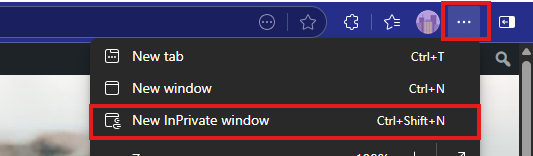
Accessing Oracle OneConnect from the County Network: If you are having issues, please try again using an In Private Browsing or Incognito TAB.
Accessing Oracle OneConnect from off-site (non-County Network): If you are off the County network, please try again using an In Private Browsing or Incognito TAB.
If this still does not work, please open a ticket by emailing [email protected].